Three Transcription Engines
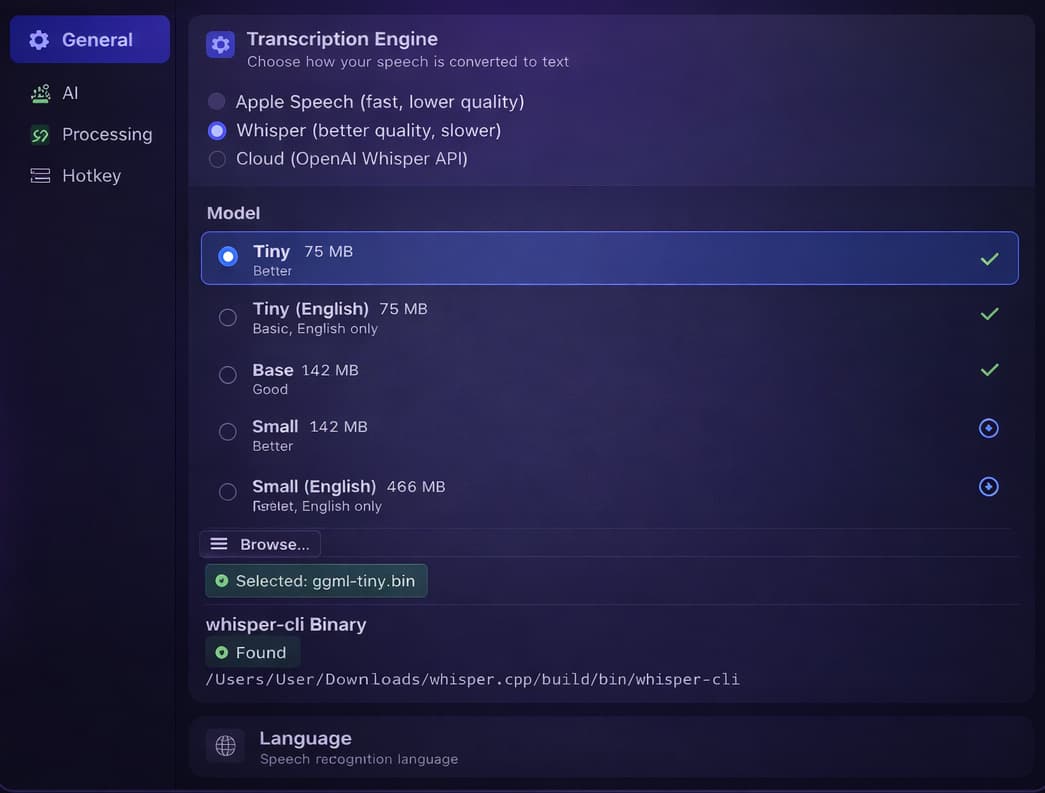
Cloud Whisper (OpenAI API, best quality), local whisper.cpp (fully private, on-device), or Apple Speech (fast, no model download). Switch anytime from Settings.
mywisper turns speech into text and pastes it anywhere on your Mac. Choose local whisper.cpp for full privacy, OpenAI Cloud Whisper for best quality, or Apple Speech for instant results — no subscription required.
Free Forever
No subscription, no account
On-Device
Audio never leaves your Mac
Open Source
MIT licensed
Built for macOS power users who value speed and privacy.
Cloud Whisper (OpenAI API, best quality), local whisper.cpp (fully private, on-device), or Apple Speech (fast, no model download). Switch anytime from Settings.
Use local whisper.cpp and your audio never leaves your Mac. No accounts, no subscriptions, no data collection.
Press ⌥Space or double-tap Fn from any app. Start and stop recording without switching windows.
Optionally run transcriptions through GPT-5 or GPT-4o to clean up, translate, or restyle. 6 built-in presets — Clean Up, Translate, Developer Style, Formal Business, and more.
Add technical terms like "Kubernetes" or "Dokploy" once. They're sent as hints to the Whisper API and AI processor so jargon is always transcribed correctly.
Every transcription is saved with timestamp, engine, duration, and language. Search, copy, or delete entries from the menu bar at any time.
mywisper is evolving fast. Here's what landed in the latest release — and there's more on the way.
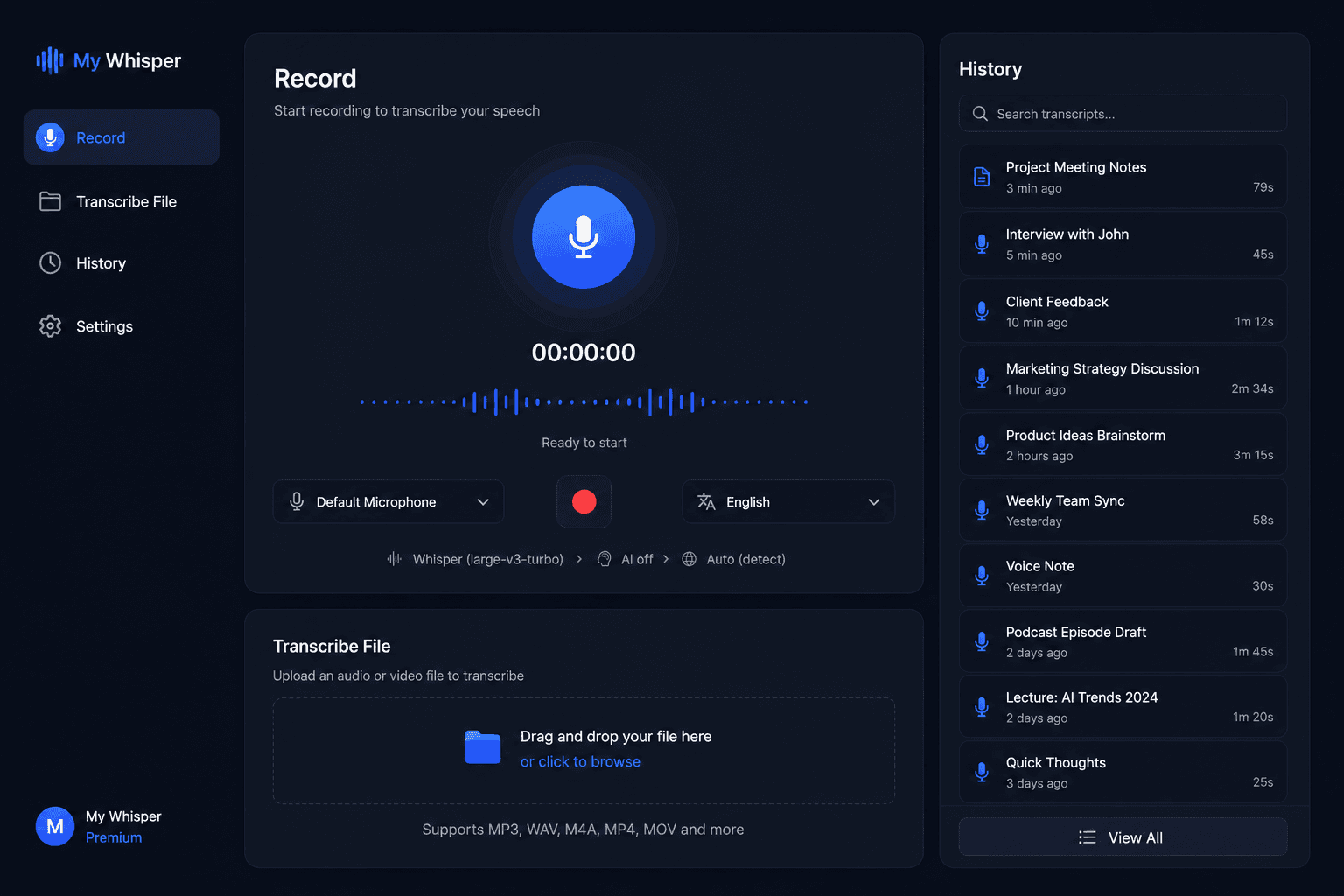
A real app window opens from the Dock: a sidebar (Record · Transcribe File · History) and a focused Record screen with a live pipeline showing engine → AI mode → language.
Drag in audio or video — WAV, MP3, M4A, AAC, FLAC, AIFF, MP4, MOV — up to 60 minutes. It runs locally in the background, so you can keep dictating while it works.
Pick the sounds that play when recording starts and stops — choose the pair you like, or turn them off entirely.
AI clean-up and translation can now run on the GPT-5 family (gpt-5-mini, gpt-5, gpt-5.5, gpt-5.5-pro) alongside GPT-4o.
Recording now starts with ⌥Space by default. Existing custom hotkeys are left untouched.
Transcribed files are saved to History with a File tag, so everything you've run lives in one searchable place.
Have a request or hit a bug? Open an issue on GitHub →
From developers to writers — anyone who thinks faster than they type.
For developers
Dictate commit messages, PR descriptions, code comments, and variable names without breaking your flow. Let AI format them into Developer Style.
Capture anything
Speak thoughts, ideas, and reminders into any app — Notes, Notion, Obsidian. No switching, no typing. Text appears where your cursor is.
Business writing
Draft emails by speaking naturally. AI Formal Business preset polishes tone and grammar automatically — ready to send in seconds.
Stay focused
Capture key points hands-free during calls. Use Clean Up preset to remove filler words and format into clean bullet points.
Multilingual
Speak in Russian, get English output. Or the reverse. Built-in Translate presets handle it in one step — transcription and translation combined.
Accessibility
Rest your hands without slowing down. mywisper works in every app — terminal, browser, email, Slack — just press the hotkey and speak.
Create your own AI Modes — reusable presets that transform every transcription. Describe what you want once; the model reads your words and your prompt and returns the finished text. Pick a mode and watch it work:
“hey um can you let the team know we're still on track for friday and i'll send the final assets tomorrow morning thanks”
Prompt: Rewrite as a clear, friendly email with a short subject line.
Describe the job in plain words. No settings, no workflows to build.
My Whisper transcribes your voice or a file — locally or via Cloud Whisper.
Your prompt is applied and the result is pasted right where you need it.
Connect your own OpenAI key and you're billed only for your own usage, at cost — no subscription and no markup on top. Prefer full privacy? Keep transcription entirely on-device.
Two layers of intelligence that make every transcription better.
After transcription, mywisper can send the raw text to GPT-5 or GPT-4o to clean it up, translate, or reformat it. Toggle on/off with a hotkey. If AI fails, the raw transcription is used as fallback — nothing is lost.
Clean Up
Fix grammar, punctuation & formatting
Translate → EN
Any language to English
Translate → RU
Any language to Russian
Developer Style
For commits, comments, docs
Warm & Friendly
Conversational tone
Formal Business
Professional emails & docs
Supported models: gpt-5-mini, gpt-5, gpt-5.5, gpt-5.5-pro, gpt-4o, gpt-4o-mini, gpt-4-turbo. Default stays gpt-4o-mini. Add custom presets from Settings → AI Processing.
Two tools that ensure your words are always transcribed the way you mean them — no AI required for corrections.
Vocabulary Hints
Add technical terms that whisper often mishears. They're sent as hints to Cloud Whisper and used by AI to correct mangled variants.
Manual Replacements
Define exact word substitutions applied after every transcription. Case-insensitive. Works with all engines.
From hotkey to pasted text in seconds.
Press ⌥Space or double-tap Fn to start recording from any app — no need to switch windows.
A floating pill overlay appears with a real-time waveform, elapsed timer, and a stop button.
Your chosen engine processes the audio — on-device with whisper.cpp or Apple Speech, or via OpenAI Cloud Whisper for maximum accuracy.
The result is optionally cleaned up by AI, corrected by your custom dictionary, and pasted directly into the active app via Cmd+V.
Pick the engine that fits your workflow. Switch anytime from Settings → General.
| Engine | Quality | Privacy | Requirements |
|---|---|---|---|
| Cloud Whisper | Best | Sends audio to OpenAI | OpenAI API key |
| Local Whisper | Great | Fully on-device | whisper.cpp binary + model |
| Apple Speech | Good | On-device | None — built into macOS |
Download any model directly inside the app. Start with Tiny and upgrade when you need more accuracy.
| Model | Size | Quality |
|---|---|---|
| Tiny / Tiny.en | 75 MB | Fast, basic accuracy |
| Base / Base.enRecommended | 142 MB | Good balance |
| Small / Small.en | 466 MB | Better accuracy |
| Medium / Medium.en | 1.5 GB | High accuracy |
| Large v3 | 3.1 GB | Best accuracy |
Models are downloaded from HuggingFace and stored in ~/Library/Application Support/mywisper/models/. The app also auto-discovers models from Superwhisper and ~/Downloads/whisper.cpp/models/.
Download mywisper for free. Requires macOS 13.3 or later.
Cross-built (CPU only, no Metal) and not yet tested on Intel hardware — best-effort.
The two builds are not interchangeable — pick the one that matches your Mac's chip.
Not sure? Apple menu → About This Mac → look for “Chip” (Apple Silicon) or “Processor” (Intel).
Open source · MIT License